
News
LibreQoS Bufferbloat Test
June 13, 2025 · LibreQoS today announced a faster, clearer way to measure internet quality under real‑world load. The updated Bufferbloat Test runs entirely in your browser from the Cloudflare...

Article
LibreQoS Bufferbloat Test
LibreQoS Launches Next‑Gen Bufferbloat Test with QoO Scoring
LibreQoS today announced a faster, clearer way to measure internet quality under real‑world load. The updated Bufferbloat Test runs entirely in your browser from the Cloudflare edge.
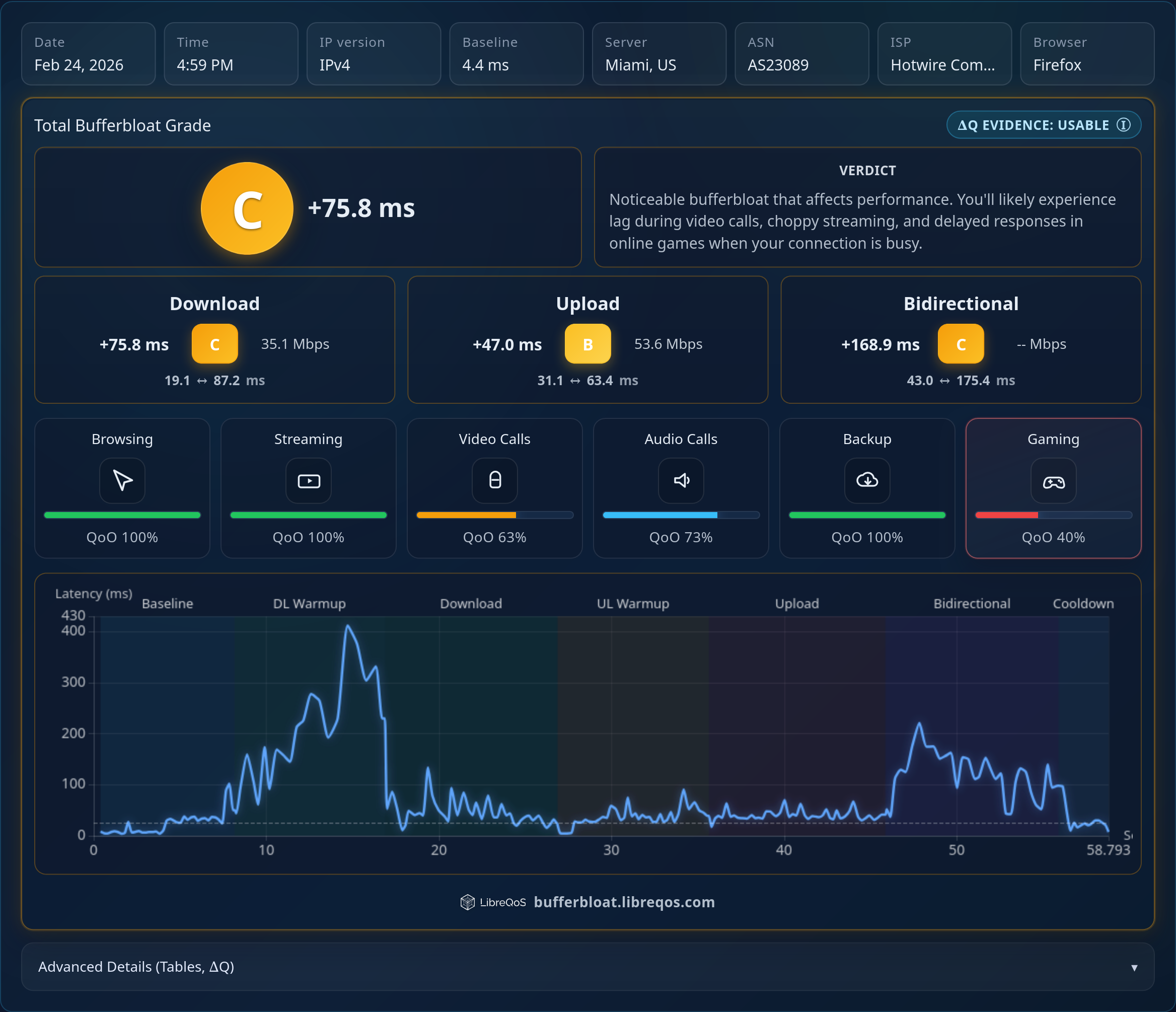
This tool implements the Quality of Outcome (QoO) framework (IETF draft-olden-ippm-qoo). Rather than just displaying raw network statistics, it calculates the probability of a perfect experience for specific applications—gaming, video conferencing, and streaming—based on your connection's behavior.
](https://bufferbloat.libreqos.com/)
What It Measures
- Quality of Outcome (QoO): We measure your connection against the specific latency and packet loss requirements of real-world applications.
- Latency under load: The delay ("bufferbloat") that appears during downloads/uploads.
- Jitter and loss: The minute‑to‑minute stability of your connection.
- Fairness: Optional "Virtual Household" mode simulates four family members (gamer, calls, streaming, updates) to reveal who is impacted most.
Why It Matters
Bufferbloat turns a "fast" connection into a laggy one during activity. ISPs and home users can quickly confirm if shaping/queueing is tuned well (e.g., CAKE/fq_codel).
The QoO metric bridges the gap between engineering metrics and human perception. It answers the question: "Will my video call freeze if someone else starts a download?"
How To Access
Works on desktop and mobile; for the most consistent result, use a wired connection and pause large background transfers.
How To Read The Results
Quality of Outcome (0%–100%) We score specific categories (Gaming, Video Calls, Streaming) based on the IETF QoO draft.
- 100%: The network meets the "Network Requirement for Perfection" (NRP). Improvement beyond this point is not noticeable to a human.
- 0%: The network has hit the "Network Requirement Point of Uselessness" (NRPoU). The application will likely fail or be unusable.
Traditional Metrics
- Grades (A–F): A quick quality indicator based on total latency under load.
- Box plot: Visualizes the latency distribution; the "Increase" is the loaded p90 minus the baseline median—the smaller, the better.
Share & Compare
One‑click "Share Results" downloads a PNG card including your QoO scores, which you can send to support or your ISP. ISPs can use aggregate scores to validate QoE improvements across regions and plans.
Rankings
See how your internet provider stacks up against others. We track the top-performing networks worldwide based on real-world bufferbloat measurements over the last 90 days.
Compare: Use the leaderboard to find better ISPs in your region or to benchmark your own network's performance.
Global Leaderboard: View the Rankings Page to see ISPs ranked by their bidirectional latency performance.
About LibreQoS
LibreQoS builds software that help ISPs deliver consistent, low‑latency internet connectivity. For media or partnership inquiries, contact: [email protected]